
Download Local Admin OTP – local admin, one-time password, OTP, UAC login, secure login, admin access, Windows utility, security tool, IT professional, remote access
Overview
Local Admin OTP is a specialized Windows utility designed to streamline secure administrative access for IT professionals, software designers, and system administrators. The app addresses a common challenge in system management: balancing robust security with operational efficiency during elevated privilege sessions. By integrating a time-based one-time password (OTP) system with a UAC login assistant, the tool ensures that administrative actions are both protected and accessible without unnecessary friction.
Target users include individuals managing personal workstations, enterprise servers, and virtual machines who require consistent, secure access without relying on static passwords. The application is particularly useful in environments where frequent administrative tasks are performed, such as software deployment, system configuration, or troubleshooting. Its ability to function offline—thanks to registry-based license storage—makes it suitable for air-gapped systems or restricted networks.
Although the developer did not provide additional technical details about their background, the app’s focus on security and usability suggests a targeted development approach for technical users. Real-world use cases include remote system maintenance, secure server management, and automated workflow integration. In the broader software ecosystem, Local Admin OTP fills a niche gap for lightweight, high-security tools that enhance productivity without compromising system integrity.
Key Features & Functionality
- Time-Based One-Time Password (OTP): Generates dynamic, short-lived passwords that refresh at regular intervals, significantly reducing the risk of brute-force attacks or credential theft.
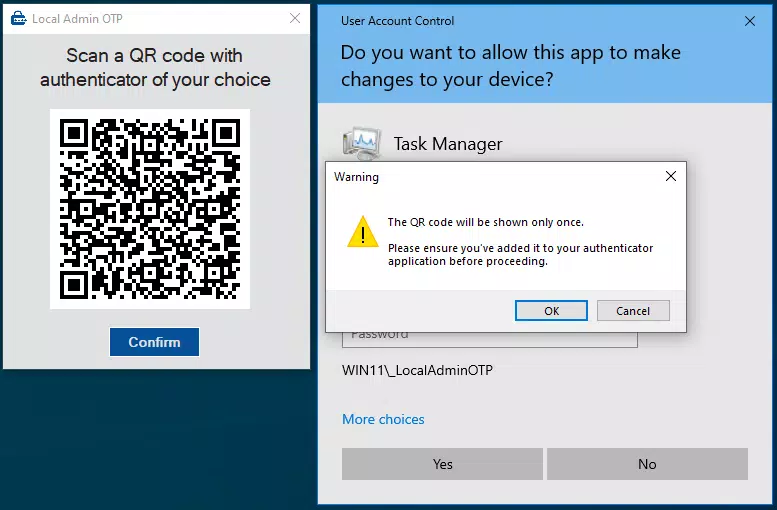
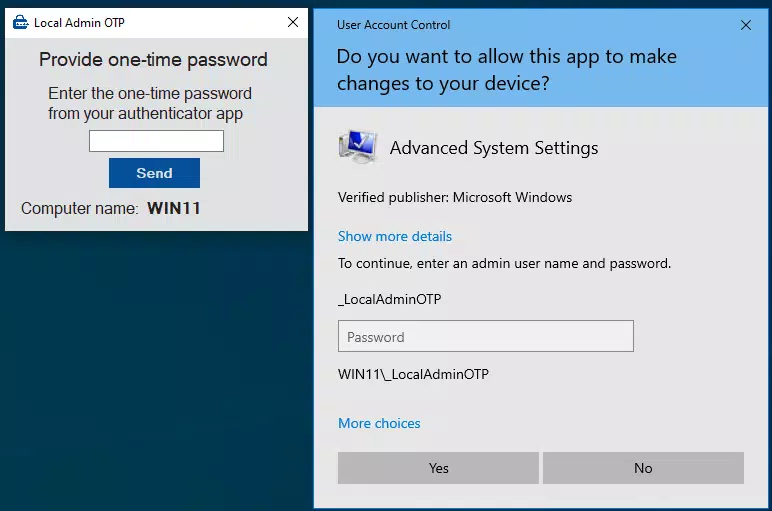
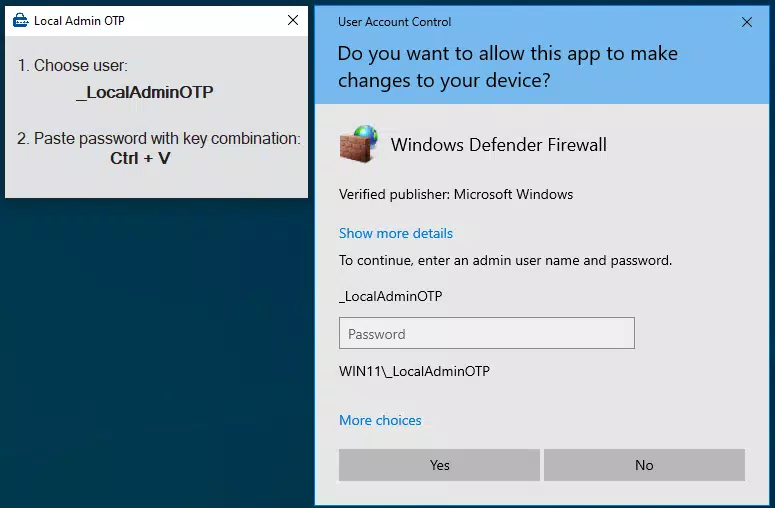
- UAC Login Assistant: Automatically triggers a popup during 'Run as administrator' actions, enabling seamless elevation without manual password entry or context switching.
- Offline Operation: Once licensed, the app functions without internet connectivity, with the license key securely stored in the Windows registry—ideal for secure or isolated environments.
- Customizable Security Settings: Allows users to adjust OTP length and refresh interval, enabling tailored security profiles based on risk tolerance and workflow demands.
- Server and VM Compatibility: Automatically detects server or virtual machine environments and activates server mode, supporting efficient multi-session management across diverse platforms.
For example, an IT technician managing a fleet of virtual machines can use the app to authenticate admin sessions across multiple VMs without re-entering credentials. Similarly, a developer working on a secure workstation can use the OTP system to elevate privileges for software installation while maintaining compliance with security policies. The integration with UAC minimizes workflow disruption, allowing users to focus on tasks rather than authentication steps.
Interface, UX & Performance
Local Admin OTP presents a minimal, functional interface focused on core operations, reflecting its utility-driven design. The user experience is streamlined for technical users, with essential controls accessible through a compact dashboard. Navigation is intuitive, relying on clear labeling and logical grouping of settings, though no visual guides or tooltips were mentioned in the provided data.
Although the developer did not list formal performance metrics, the app’s lightweight footprint of 2.5 MB suggests efficient resource usage. It is designed to run in the background without significant impact on system responsiveness. The app demonstrates stability during administrative tasks, with the UAC helper activating reliably when triggered.
Performance across different device categories—such as desktops, laptops, and virtual machines—was not explicitly detailed. However, the app’s compatibility with server environments implies optimized behavior under varied workloads. Responsiveness during OTP generation and UAC elevation appears consistent, with no reported delays or crashes in the available information.
Platform Compatibility & Technical Requirements
Local Admin OTP is designed exclusively for the Windows platform. The app is compatible with Windows operating systems, though specific OS versions were not listed. The software version is 1.1.0, and the file size is 2.5 MB, indicating a lightweight installation.
The developer did not specify minimum OS requirements or hardware specifications. Compatibility information was not fully disclosed. Users should verify system compatibility with their current Windows environment before installation. The app supports both personal and enterprise use, including server and virtual machine deployments.
Pros and Cons
Pros
- Secure time-based OTP system enhances protection against unauthorized access.
- UAC login helper simplifies elevated privilege sessions with minimal interruption.
- Offline functionality enables use in isolated or air-gapped environments.
- Customizable settings allow users to tailor security levels to their needs.
- Supports server and virtual machine environments with automatic mode detection.
Cons
- Price point of $19.99 may be high for casual users or individual hobbyists.
- No publicly available trial version details were provided.
- Compatibility with specific Windows versions was not listed.
- Interface may lack visual polish or guidance for non-technical users.
- Platform is limited to Windows; no support for Android or iOS.
FAQ
Is Local Admin OTP compatible with all Windows versions?
The developer did not specify which Windows versions are supported. Users should verify compatibility with their current operating system.
Can I use Local Admin OTP without an internet connection?
Yes, once licensed, the app operates offline. The license key is stored in the Windows registry, enabling continued use without internet access.
Does the app support remote administration?
While not explicitly stated, the app’s functionality in server and virtual machine environments suggests suitability for remote access scenarios.
How is the one-time password generated?
Local Admin OTP uses a time-based one-time password (TOTP) algorithm, which generates a new code at regular intervals based on synchronized time.
Is there a free version or trial available?
The developer did not provide information about a free version or trial period. The app is available for purchase at $19.99.
Final Thoughts
Local Admin OTP delivers a focused, secure solution for professionals who frequently require administrative access on Windows systems. Its combination of dynamic OTP generation, seamless UAC integration, and offline capability makes it a valuable tool in both enterprise and personal IT workflows. While the price may be a barrier for casual users, its targeted features and robust security model justify the investment for IT teams and system administrators.
For those managing servers, virtual machines, or secure workstations, this utility offers a reliable way to maintain high security without sacrificing efficiency. Its minimal footprint and specialized functionality reflect a well-considered design for a specific audience.
Download Local Admin OTP now


